When disconnecting
Concept#
This webhook is responsible for disconnecting
Attention
Z-API does not accept webhooks that aren’t HTTPS
Updating the webhook#
To update the webhook route, you can do it through the API or through the admin panel.
API#
/update-webhook-disconnected#
PUT https://api.z-api.io/instances/YOUR_INSTANCE/token/YOUR_TOKEN/update-webhook-disconnected
Header#
| Key | Value |
|---|---|
| Client-Token | ACCOUNT SECURITY TOKEN |
Request Body#
Administrative panel#
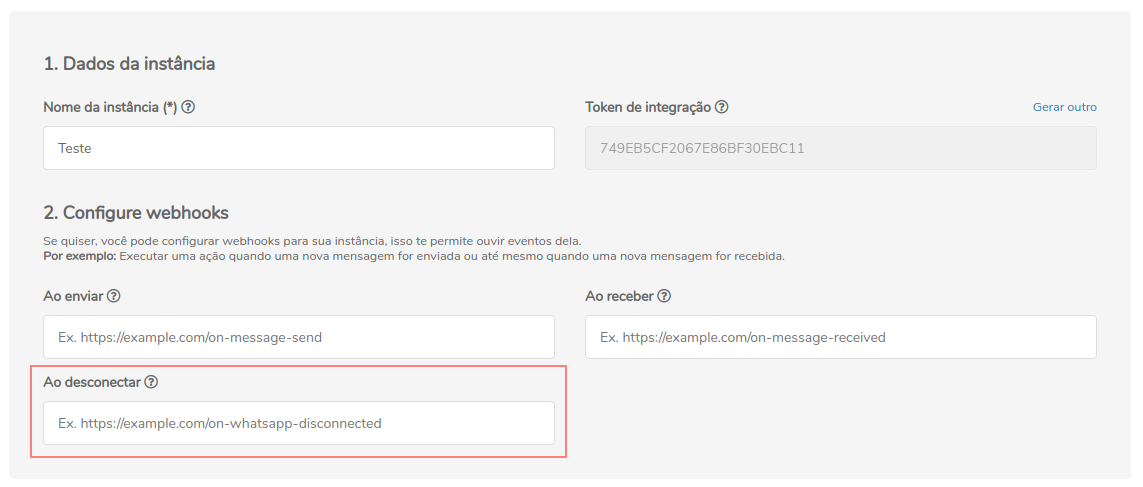
Webhook's return#
The possible returns of the on-whatsapp-disconnected webhook are registered below:
Response#
| Attributes | Type | Description |
|---|---|---|
| momment | integer | Time when the instance was disconnected from the number. |
| error | string | Error’s description |
| disconnected | boolean | Indication whether the instance is connected with the number or not. |
| type | string | Instance event type, in this case it will be "DisconnectedCallback". |
200#
405#
In this case certify that you are sending the correct specification of the method. This means, verify if you sent a POST or PUT as specified at the beginning of this topic.
415#
In case you receive 415 error, make sure to add the “Content-Type” of the object you are sending in the request headers, mostly “application/json”